
Webhooks
When a payment status changes, we send a POST request to your webhook URL. Set the URL in
Integration → API keys & webhooks → Webhooks.
Request
POST https://your-site.example/payments/webhook
Content-Type: application/json{
"data": "eyJpZCI6IjZmMWMuLi4iLCJ0eXBlIjoi…",
"sign": "q4Rk3Zl0yK…",
"callbackUrl": "https://your-site.example/payments/webhook"
}| Field | Description |
|---|---|
data | The event as JSON, encoded in Base64. |
sign | Base64 HMAC-SHA256 of the data string, signed with your secret key. |
callbackUrl | The URL the webhook was sent to. Not signed — don't rely on it. |
Decoded data:
{
  "id": "1c09…",
  "type": "order.success",
  "customer_email": "[email protected]",
  "order_id": "order-1002",
  "total_amount": 49.9,
  "currency_code": "EUR",
  "payment_status": "COMPLETED"
}| Field | Description |
|---|---|
id | ID of this webhook event. It is not the payment_id of the status API; match payments by order_id. |
type | order.partial_complete (ACCEPTED_SETTLEMENT_IN_PROCESS), order.success (COMPLETED) or order.failed (CANCELED). |
customer_email | Email passed when the payment was created, if any. |
order_id | Your merchant_order_id. |
total_amount | Amount in EUR — compare it with your order. |
currency_code | EUR. |
payment_status | See Payment statuses. |
A test webhook has "type": "order.success", "order_id": "test-webhook" and
"is_test": true.
Verify the signature
Compute the HMAC over the Base64 string exactly as received (don't decode it first) and compare it with sign.
Reject requests with a wrong signature (answer 422).
// Node.js (Express)
import crypto from 'node:crypto';
import express from 'express';

const app = express();

app.post('/payments/webhook', express.json(), (req, res) => {
  const { data, sign } = req.body;
  const expected = crypto.createHmac('sha256', process.env.WEBHOOK_SECRET).update(data).digest('base64');
  const valid =
    typeof sign === 'string' &&
    sign.length === expected.length &&
    crypto.timingSafeEqual(Buffer.from(sign), Buffer.from(expected));
  if (!valid) return res.status(422).send('invalid signature');

  const event = JSON.parse(Buffer.from(data, 'base64').toString('utf8'));
  // update the order by event.order_id and event.payment_status (idempotently)
  res.status(200).send('OK');
});

app.listen(3000);
Answer 200 OK
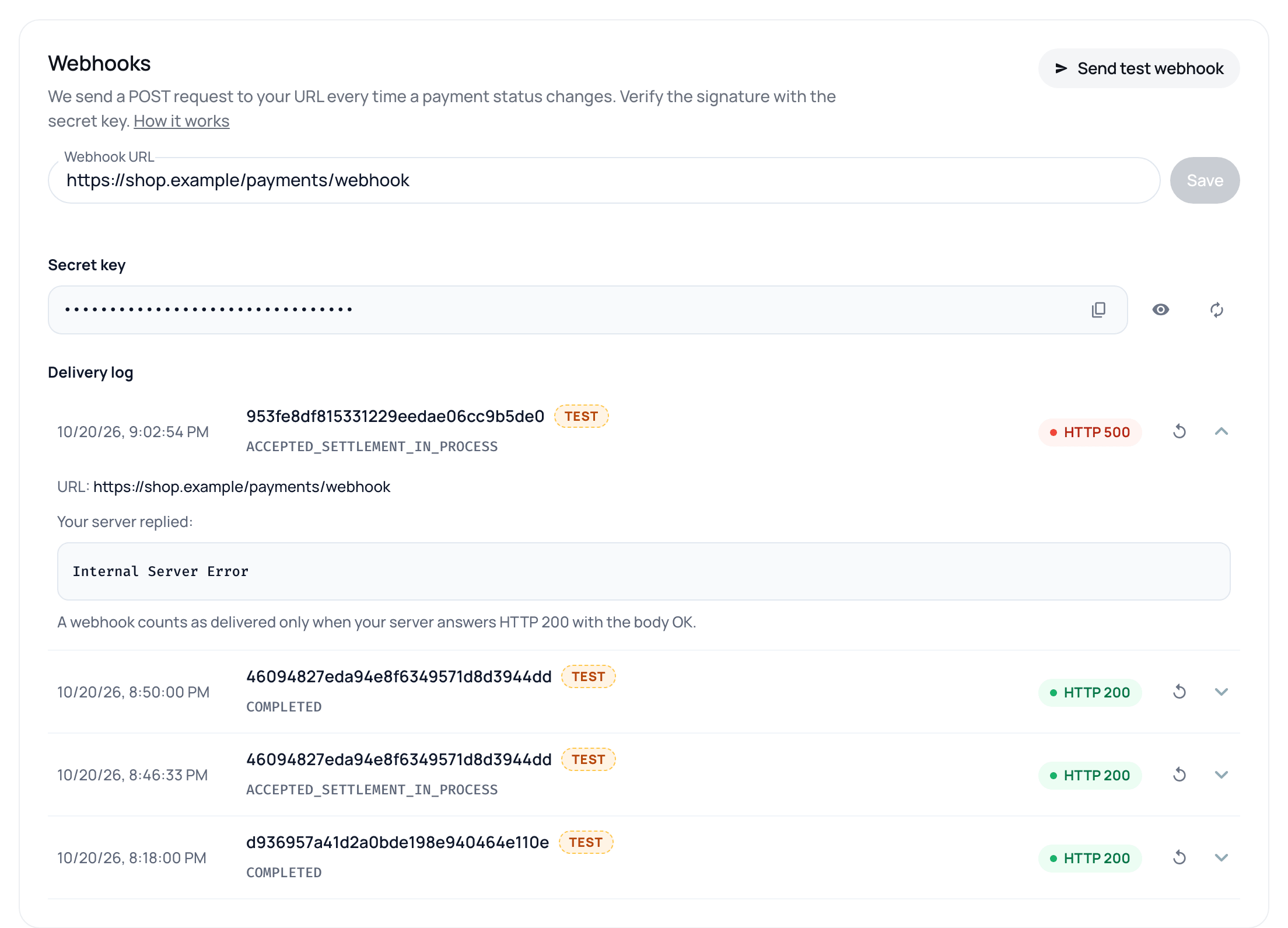
A webhook counts as delivered only when your server answers HTTP 200 with the body OK within 7 seconds.
Anything else is a failed delivery: we retry it with increasing intervals for up to 2 days.
- Process webhooks idempotently: the same status can arrive more than once.
- Statuses can arrive out of order; never move an order back from
COMPLETED. - Do the heavy work (emails, fulfilment) after answering, in the background.
Delivery log and test webhook
Integration → API keys & webhooks → Webhooks → Delivery log lists every webhook with your server's HTTP status. Click a row to see the URL and your server's response body; the Send again button (circular arrow) resends it.
Send test webhook sends a signed test event to your URL right away and shows whether your server answered OK.
Test events appear in the delivery log too, marked Test event, so you can see the request and your server's
response.
If the test webhook is not counted as delivered:
| The cabinet says | What to fix |
|---|---|
reached your server (HTTP 200), but the body was not OK | Your endpoint works but returns another body (empty, JSON, an HTML page). Return exactly OK as the body. |
| your server answered HTTP 4xx/5xx | Check that the URL is right, the route accepts POST and does not require login or a CSRF token, and look at your server log. |
| your server did not answer | The URL must be public https, answer within 7 seconds and not redirect. Local addresses (localhost, private IPs) are not allowed. |
Secret key
The secret key signs every webhook. Show (eye icon) or copy it in Integration → API keys & webhooks → Webhooks. If it leaks, click Generate a new secret (the circular arrows next to it): the old one stops working immediately, so update your server at the same time.
Sender IP addresses
If your firewall needs the list of addresses webhooks come from, ask support. Always verify the signature — it is the reliable check.
Payouts
Payouts to customers send two more events to the same URL with the same signature:
| Event | When |
|---|---|
payout.completed | The USDT arrived at the customer's address (status COMPLETED, tx_hash set). |
payout.failed | The payout did not go through: status FAILED (transfer failed, funds returned), REJECTED (declined by our team, see reject_reason) or CANCELED. |
bulk.completed | Every row of a bulk payout settled; the body carries the bulk under bulk with status, counts and items. |
The decoded body carries the payout under payout, with the same fields as GET /v2/payouts/{id}:
{
  "id": "0b0f5b3a-2a6e-4d4a-9f44-6f1a9c2d1e10",
  "type": "payout.completed",
  "payout": {
    "id": "f862a327-8835-4de6-9d1e-6b1abf2eaba7",
    "merchant_payout_id": "refund-1002",
    "status": "COMPLETED",
    "network": "TRON",
    "address": "TAVpUHkqQDccAZhCeYaJ1hVxfMmhMBFnuR",
    "amount": 25,
    "currency": "USDT",
    "amount_eur": 22.2,
    "fee_eur": 2.44,
    "total_eur": 24.64,
    "rate": 1.126063,
    "tx_hash": "ed1b885b137e52e5898ab40f8c6b2b3b840dc38a4652ec13354c27f1e35b8e5f",
    "failure_reason": null,
    "reject_reason": null,
    "customer_email": "[email protected]",
    "description": "Refund of order 1002",
    "is_test": false,
    "created_at": "2026-11-04T11:55:48.991Z",
    "completed_at": "2026-11-04T12:01:10.004Z"
  }
}
Answer 200 with the body OK, as for payments; unanswered webhooks are retried for two days.
Crypto top-ups
A top-up with USDT that lands on your balance sends deposit.credited, same URL, same signature.
The body carries the top-up under deposit, with the same fields as GET /v2/deposits/{id}:
{
  "id": "7f1c9b7e-3f0e-4d3f-9f0e-6a4b2c1d8e90",
  "type": "deposit.credited",
  "deposit": {
    "id": "e5d0f786-a607-4f2a-a755-bffe76f2635b",
    "status": "credited",
    "network": "TRON",
    "address": "TMc7TBdBJkRCsCRDtGFmTZRzkV1ePTcqCo",
    "from_address": "TAVpUHkqQDccAZhCeYaJ1hVxfMmhMBFnuR",
    "tx_hash": "7cbe1b75a97ebaf897cc2bf43b1e072c925a9d732a3c552c082f628424723c3e",
    "amount_usdt": 2,
    "amount_eur": 1.77,
    "fee_pct": 0,
    "fee_eur": 0,
    "credited_eur": 1.77,
    "rate": 1.1275864,
    "rate_fixed_at": "2026-11-04T13:00:00.272Z",
    "is_test": false,
    "confirmed_at": "2026-11-04T13:25:08.000Z",
    "created_at": "2026-11-04T13:25:09.412Z"
  }
}
Transfers below the minimum are never credited and send no webhook; they are listed by
GET /v2/deposits?status=ignored.
Manual balance credits
When our team credits your balance by hand (a bank transfer that reached our account,
an adjustment) you receive balance.credited, same URL, same signature, with the credit under credit:
{
  "id": "5b0c2d4e-7a8f-4c1d-9e2b-3f4a5b6c7d8e",
  "type": "balance.credited",
  "credit": {
    "id": "b1410d36-80c0-4c24-baa6-586924a24282",
    "amount_eur": 10,
    "currency": "EUR",
    "source": "bank_transfer",
    "reference": "BANK-2026-11-04-002",
    "comment": "second wire",
    "is_test": false,
    "created_at": "2026-11-04T14:23:39.665Z"
  }
}
source is bank_transfer, adjustment or other; reference is the payment reference of the transfer (or the
ticket of an adjustment), unique per merchant.