
Top up with USDT
Send USDT to your personal deposit address and it is credited to your EUR balance at the fixed exchange rate, within minutes, without any action on your side. There is one address per network — TRON (TRC-20) and Ethereum (ERC-20) — reserved for you alone.
Get your address
- Open Top up in the cabinet and scroll to With USDT.
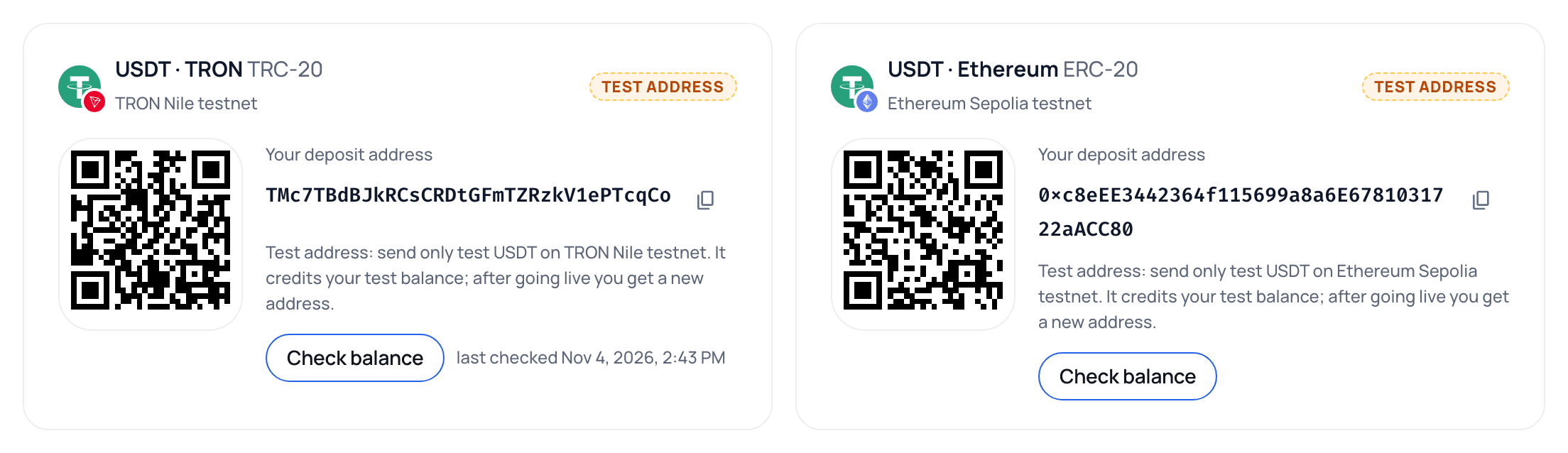
- Click Get TRON address (or Get Ethereum address). The address is reserved for you and does not change; show it as a QR code or copy it.
- Send USDT to it from any wallet or exchange. Only USDT, only on the network of the address: coins sent on another network or another token are lost.
What gets credited
| Rate | The EUR/USDT rate is fixed every hour. The fixing current when the network confirms your transfer is used, and shown with every top-up. |
| Fee | A percentage of the EUR value, deducted from the credited amount. The default is 0 %; your fee is shown under How crypto top-ups work. |
| Minimum | Transfers below the minimum (1 USDT by default) are recorded but not credited. |
| Timing | TRON: once the block is final (about a minute). Ethereum: after a few confirmations (a few minutes). |
Example: you send 115 USDT while 1 EUR = 1.15 USDT; the EUR value is 100 EUR; with a 2 % fee 98 EUR lands on your balance.
Every credited top-up appears in Transactions as an incoming row of type Crypto top-up, with the USDT received, the rate, the sender and the transaction hash, and in the history on the Top up page.
Check balance
We watch your addresses on the network and credit transfers automatically. If a transfer takes longer than expected, click Check balance: we read the address directly from the network, show what sits on it, and pick up any transfer our watcher missed; it is then credited within a minute. One check per minute per address.
Testing
Your test mode has its own deposit addresses, marked Test address in the cabinet. What arrives at a test address is credited to your test balance only — even after you go live — and going live gives you new, live addresses. A test address never credits your live balance, and a live address never credits the test one.
Which network an address is on follows from your mode, the same on every environment:
| Mode | Deposit addresses | How to top up |
|---|---|---|
| Test mode | On the test networks: TRON Nile and Ethereum Sepolia | Send free test USDT (below). |
| Live mode | On the real networks: TRON and Ethereum | Send real USDT. |
In test mode the Top up page names the networks TRON Nile testnet / Ethereum Sepolia testnet and shows a step-by-step guide above the addresses.
Get test USDT on TRON Nile
- Install TronLink and switch it to the Nile testnet.
- Get free test TRX and test USDT at the Nile faucet.
- Send test USDT — contract
TXYZopYRdj2D9XRtbG411XZZ3kM5VkAeBf— to your TRON test address. Keep a little TRX in your wallet for the network fee.
Get test USDT on Ethereum Sepolia
- Switch MetaMask (or any wallet) to Sepolia.
- Get free Sepolia ETH for the fee at a faucet, for example the Google Cloud faucet.
- Mint test USDT at the Aave faucet (turn on testnet mode, Sepolia market) —
token
0xaA8E23Fb1079EA71e0a56F48a2aA51851D8433D0— and send it to your Ethereum test address.
What to check
- The transfer shows up under Check balance as Waiting for confirmations, then Credited.
- Transactions shows a Crypto top-up (marked Test) with the EUR credited and the rate.
- Your webhook URL receives
deposit.credited. - The new test balance pays for a test payout.
API
Everything the cabinet does is available with your API key (see Authentication). All
amounts are numbers; network is TRON or ETHEREUM.
Your deposit address
GET /v2/deposits/address?network=TRON returns the address on that network, reserving it on the first call
(201; 200 afterwards).
curl "https://api.finorapayment.com/api/v2/deposits/address?network=TRON" \
  -H "x-api-key: YOUR_API_KEY"
Response:
{
  "data": {
    "id": "a1ebf0cf-b991-4dcc-96d9-7b2651b8dc30",
    "network": "TRON",
    "address": "TMc7TBdBJkRCsCRDtGFmTZRzkV1ePTcqCo",
    "currency": "USDT",
    "last_checked_at": null,
    "is_test": true,
    "network_mode": "testnet",
    "network_name": "TRON Nile testnet",
    "created_at": "2026-11-04T13:29:03.551Z"
  }
}
is_test is true for the address of your test mode; network_mode says which network it is on: testnet (TRON
Nile / Ethereum Sepolia) for a test address, mainnet (the real networks) for a live one. GET /v2/deposits/addresses lists the addresses of your current mode on every network.
Terms
GET /v2/deposits/terms — whether top-ups are on, the minimum, your fee and the current fixing.
curl "https://api.finorapayment.com/api/v2/deposits/terms" \
  -H "x-api-key: YOUR_API_KEY"
Response:
{
  "data": {
    "is_enabled": true,
    "min_usdt": 1,
    "fee_pct": 0,
    "networks": ["TRON", "ETHEREUM"],
    "currency": "USDT",
    "rate": 1.1275864,
    "rate_fixed_at": "2026-11-04T13:00:00.272Z",
    "is_test": false,
    "network_mode": "mainnet",
    "network_names": { "TRON": "TRON", "ETHEREUM": "Ethereum" },
    "addresses_available": true
  }
}
Check an address
POST /v2/deposits/address/check?network=TRON reads the address from the network (once a minute per address).
curl -X POST "https://api.finorapayment.com/api/v2/deposits/address/check?network=TRON" \
  -H "x-api-key: YOUR_API_KEY"
Response:
{
  "data": {
    "network": "TRON",
    "address": "TMc7TBdBJkRCsCRDtGFmTZRzkV1ePTcqCo",
    "usdt_balance": 2,
    "checked_at": "2026-11-04T13:29:03.610Z",
    "new_deposits": 1,
    "deposits": [
      {
        "tx_hash": "7cbe1b75a97ebaf897cc2bf43b1e072c925a9d732a3c552c082f628424723c3e",
        "amount": 2,
        "currency": "USDT",
        "status": "detected",
        "from_address": "TAVpUHkqQDccAZhCeYaJ1hVxfMmhMBFnuR",
        "detected_at": "2026-11-04T13:24:29.053Z",
        "reason": null
      }
    ]
  }
}
status of a transfer: detected (waiting for confirmations), confirmed (being credited), credited,
ignored (below the minimum, see reason), failed (reverted on chain). usdt_balance is what sits on the
address right now; we move it to our treasury from time to time, so it is not your balance.
History
GET /v2/deposits?status=credited&limit=20&offset=0 lists your top-ups, newest first; GET /v2/deposits/{id}
returns one.
curl "https://api.finorapayment.com/api/v2/deposits?status=credited&limit=20&offset=0" \
  -H "x-api-key: YOUR_API_KEY"
A top-up:
{
  "id": "e5d0f786-a607-4f2a-a755-bffe76f2635b",
  "status": "credited",
  "reason": null,
  "network": "TRON",
  "address": "TMc7TBdBJkRCsCRDtGFmTZRzkV1ePTcqCo",
  "from_address": "TAVpUHkqQDccAZhCeYaJ1hVxfMmhMBFnuR",
  "tx_hash": "7cbe1b75a97ebaf897cc2bf43b1e072c925a9d732a3c552c082f628424723c3e",
  "amount_usdt": 2,
  "amount_eur": 1.77,
  "fee_pct": 0,
  "fee_eur": 0,
  "credited_eur": 1.77,
  "rate": 1.1275864,
  "rate_fixed_at": "2026-11-04T13:00:00.272Z",
  "is_test": false,
  "confirmed_at": "2026-11-04T13:25:08.000Z",
  "created_at": "2026-11-04T13:25:09.412Z"
}
Webhook
When a top-up is credited we send deposit.credited to your webhook URL, signed like every other event, with the
top-up under deposit (the same fields as above). See Webhooks.
Errors
| HTTP | code | When |
|---|---|---|
| 429 | deposit_check_too_often | The address was checked less than a minute ago. |
| 404 | deposit_not_found | No address on this network yet (check), or no top-up with this id. |
| 409 | deposits_unavailable | Crypto top-ups are paused (or the network of your mode is); try later. |
| 400 | payout_invalid_request | network is not TRON or ETHEREUM. |