
Authentication
Base URL
Payments (create, check, bank list) go to:
https://api.finorapayment.com/v1Payouts, top-ups, balance and rates go to:
https://api.finorapayment.com/apiBoth use the same API key.
Requests and responses use JSON (Content-Type: application/json) and HTTPS.
API key
Authenticate every request with the x-api-key header:
curl "https://api.finorapayment.com/v1/payments/order-1001" \
  -H "x-api-key: YOUR_API_KEY"
Create keys in the cabinet: Integration → API keys & webhooks → API keys → Create key. The key is shown once; we store only a hash and cannot show it again. If a key is lost or leaked, create a new one, update your server and revoke the old key — revoked keys stop working immediately.
The same keys work in test and live mode: the mode belongs to your account, not to the key.
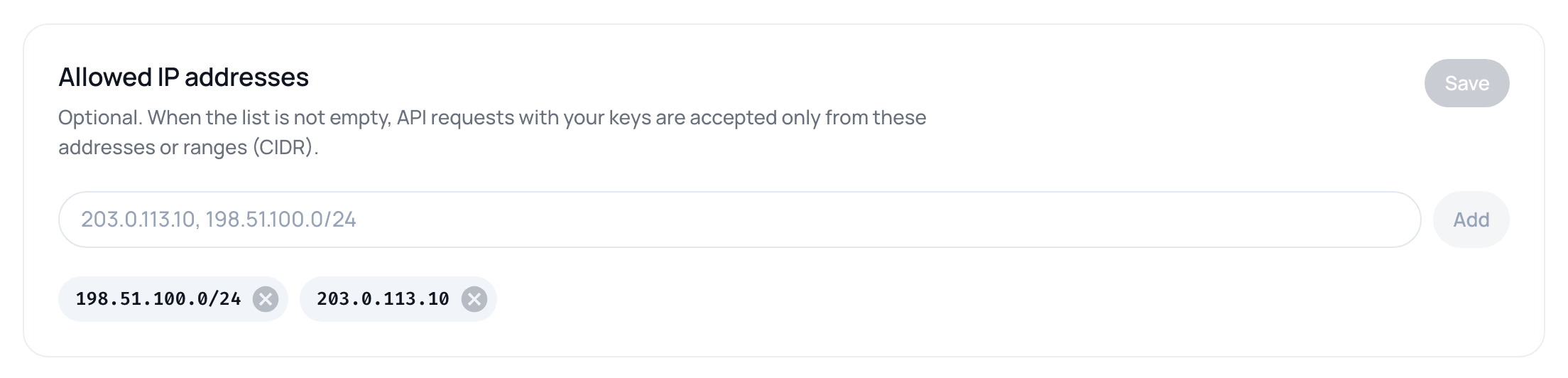
Allowed IP addresses
You can restrict API access to your servers: Integration → API keys & webhooks → Allowed IP addresses. Enter
IPv4/IPv6 addresses or CIDR ranges (for example 198.51.100.0/24; several at once separated by commas), click Add
and then Save. When the list is not empty, requests with your keys from any other address are rejected with 403.
An empty list means requests are accepted from anywhere.
Rate limits
The API allows bursts of requests per key; if you exceed the limit you get 429 Too Many Requests. Retry after a short
pause with exponential back-off.